PDANet for the iPhone is the first application to truly offer you an option for sharing your iPhone’s internet connection with your computer. It doesn’t use proxy or socks protocols with complex setup procedures; it simply turns your iPhone into a wireless router. This is a step by step how-to guide on getting PDANet up and running with your iPhone with Windows Vista.
1) The first step is to jailbreak your iPhone if it hasn’t been done already. Follow the link below for a great how-to guide on jail breaking 2.1.
https://www.iclarified.com/entry/index.php?enid=1881
2) Download PDANet from Cydia. It will be in the Networking section.
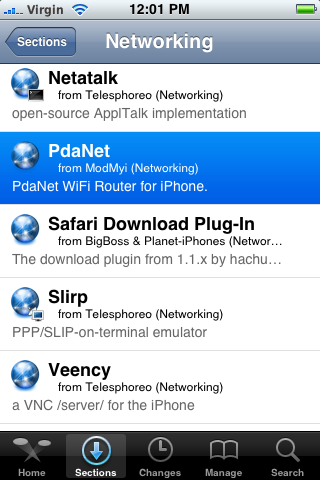
3) Once installed, the next step is to create an adhoc wireless connection with your computer. There are a few variations on the way to do this but the following I found to work best with the iPhone.
a) Go to “control panel” and click on “Network and Sharing Center” if in classic view or view network status and tasks under the “Network and Internet” title if in the standard view.

On the left hand side click the “Manage network connections” link. Navigate to your wireless connection, right click and go to properties.
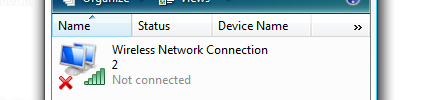
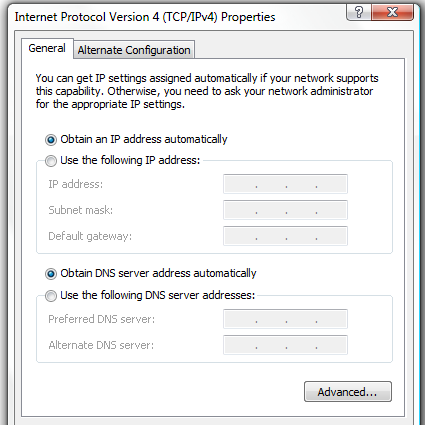
Select the one that says “Internet Protocol Version 4” and hit the properties button below.
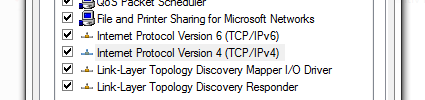
Make sure that in both sections it is set to automatically get the ip and DNS settings. If it isn’t right down the current settings so that after you stop using PDANet you can revert back to the original settings so you can get back on your normal wireless network.
b) Now close all the windows you just opened except the Network and Sharing Center. Select “Connect to a network”. Go to the bottom of the window and hit “Set up a connection or network”. Hit the set up a wireless ad hoc network option and go next.
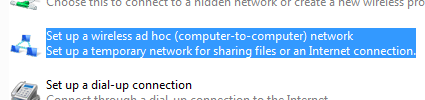
Read the following and hit next. This next screen will allow you to name your network and put on security if you choose. I named mine iPhone 3G, something nice and easy to remember. Choose your security type and password. I didn’t use one for this guide and just selected “No authentication”. If you wish to use this again I would suggest ticking the save this network box. Now your computer is ready and waiting to accept connections from your phone.
c) *Note* This step is only required if you wish to connect to your pc with a static ip. This may be useful if you are having problems. Otherwise just create a adhoc connection like below and leave the settings to default (DHCP).
Go to your iPhone and go to Settings then Wi-Fi Networks. Click on the wireless adhoc connection you just created, in my case iPhone 3G. Press the blue arrow to bring you to the settings. Press on the Static tab and enter the following details, leaving the rest blank.
IP Address: 169.254.70.84
Subnet Mask: 255.255.0.0
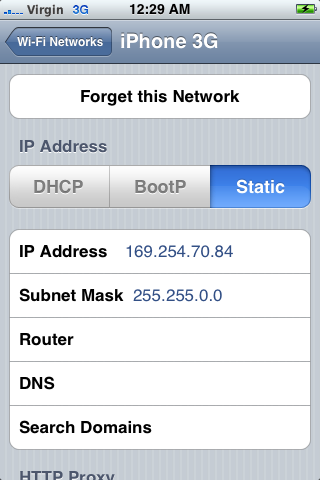
Go back to the main Wi-Fi section and click on the name of your wireless adhoc and which will connect you to it. It will show a tick next to it once you have successfully connected.
4) Now finally just go to PDANet and fire it up. Go to the bottom and switch on “Wi-Fi router”. Now press the home button to exit. Even if you exit the program, or start use the iPhone the connection will remain.
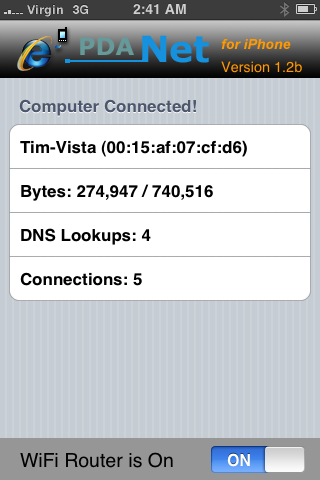
Congratulations your done! Just go back to your computer and fire up your browser and you should be connected to the net. Just be make sure to hook up your iPhone to a power outlet as this app eats up your battery.
I have the same issue as keith. My laptop running vista just refuses to see the iPhone enter the ad-hoc network even when the iPhone is saying it is connected.
I have the same problem it says i am connected on my iphone but it shows my 3g connection and my computer says waiting for users to connect and pda net doesnt recognize any connection i tried everything with vista i cant get it to work but on my mac its fine any solution?
Hey to all you guys having vista problems, I have a solution!
Try out iModem – http://isoftcom.com/?p=products&id=imodem
It uses the USB connection to your phone instead of wifi, and since your phone is probably going to be hooked up to your computer for power anyway, that’s not a big deal. You’ll have to install a client on your computer which will install the daemon on your phone – it all worked smoothly though.
This works like a charm – you might wanna buy it later on down the road – I think it’s worth it.
hey can someone help me i downloaded everything and it’s connected, but it just wont connect to the internet on my laptop…
i dont know what i’m doing wrong…
I forgot to write down the Internet Protocol info and now i want to go back to my normal wirless connection, how do i put back the info i had? and where is it located? HELP! PLEASE
Quick back story..
I had an XP laptop and instantly fell in love with PDANET. I worked IT and would use it almost everyday! So much I paid for Pdanet..
Alas my laptop sux’d and I bought a new one.. It had Vista on it which I had planned to wipe and install XP but with some driver issues I stuck with it. Suddenly I was plagued with establishing a connection and started regretting paying for an app that could really one day stop working.
But to my honest surprise an update popped up on Cydia to push me to version 1.42 and now I can connect with absolutely no issues!!
In short GO GET VERSION 1.42 NOW!! I;ve got mine …. go get yours!
Meant to write here is my speed test from my tethered phone..
http://www.speedtest.net/result/381691377.png
worked perfectly on my iphone. thnx!
The only things that I’d like to have on PdaNet is allowing access to “https:” sites. It seems that I can’t access those sites. These sites include my email, logging into a secured account. Am I doing anything wrong. Should I change something in the settings?
Jon, your problem is that you are probably using the free version of PdaNet. It doesn’t allow the use of any “https:” sites. The paid version allows all websites.
same as others with aspire one.
connection drops after 30 seconds…. i found that if you create network activity by clicking from link to link the connection stays open, but when you stop you only have 30 seconds till dropped…
NEED FIX!!
this is on 1.4 and 1.51
PdaNet is an excellent application and well worth the $30 for it. However I have the same problem as Jimsmith descriped. If you keep the connection/open for the specific port/socket it can last forever. The moment you stop browsing, or steaming a video. You have to disconnect and reconnect again.
Any ideas?
Pdanet wont connect in vista? Just roll back your wireless driver.
No matter what I do I can not get PdaNet to turn on.
I created an ad hoc network on my laptop.
Says “waiting for users to join”
PdaNet installed.
iPhone finds ad hoc network.
Says PdaNet is ready and working. But will n not connect.
When I look in the PdaNet settings, it has a red x and says “PdaNet Off.
What the hell am I doing wrong?
Thanks for your help.
John
John, I was having the exact problem as you. I tried everything that was suggested…still “waiting for users to join…”. Finally gave up. A friend suggested that I try a USB plug-in wi-fi card (Linksys Cisco w/ Speed Booster)…works freakin great now! I have a fairly new Toshiba laptop with Vista…it was the actual built-in wi-fi card that was dis-allowing it to work. The plug-in will run you $30+ dollars, but it’s well worth it (you can always take it back if it happens not to work for you).
I just recently purchased PDAnet and have a intel Macbook. I have jailbroken my phone, installed PDAnet and have successfully connected to the internet through the iphone with my macbook. However, I want to take it to the next level, which is setting up an airport express network using the iphone. Essentially I want to use my iphone internet connection to play music wirelessly through Airport express, which I think would be great when I go on trips and don’t want to pay for internet access. Any tips?
Also, on a slightly unrelated but related topic, airfoil rocks! It allows you to play any music source through airport express – I stream pandora (it also is available on the app store) and cnn right now.
Thanks!
Hey guys! Listen I have tryed this app on my brothers Vista Comp and it worked. However, completely trusting this app, I bought a refurbished dell computer from eBay with XP professional service pack 2. Will pdanet work with my XP computer? Thanks so much in advance!
Works great with Windows XP. After you’ve created the ad-hoc network on the pc, you have to right click the network icon in the tray and choose “view available wireless networks” and connect to the ad-hoc network. (It will look like it isn’t doing anything , just trying to connect) Once you do that , you will be able to see the ad-hoc network on the phone. Connect to the ad-hoc network with the iphone and once you’re connected start PDAnet and it should work.
That’s what I did and it works fine for me. If it doesn’t work for you, I don’t know. This is a very cool product though. I had been paying for internet access throught-mobile and the speed was total crap, worse then dial up. After you pay for this app once, you can connect as much as you like and just use the data plan, which means you get to connect and pay nothing more then you’re already paying.
hey guys. I have windows vista and it never worked with pdanet. I think its the built-in wiresless card. I tried using an external wireless usb card and it worked perfectly. I think the focuss should be on the internal wireless card on your vista laptop.
Help!!!!!!!How to create ad-hoc network for xp sp2?
This does work.
However to setup your PCs wireless adapter / card to ADHOC mode, you have to go into:
—-> DEVICE MANAGER —-> NETWORK ADAPTERS —-> Right click ‘YOUR WIRELESS CARD’ —-> PROPERTIES —-> ADVANCED ‘tab’ —-> NETWORK TYPE :::: Set this option to ADHOC and you’re good to go
Also, WPA often doesn’t work so cruddy WEP maybe the best you’ll get security wise.
For most of you that are having issues with staying connected, I resolved it by downloading the backgrounder app and only enabling pdanet for it. That way when you lock the iPhone, your connection keeps streaming.
I’m also having the same issue as ethan & keith “My computer does not see my phone enter the adhoc network. The phone acts like it’s connected but my computer says, ‘waiting for users to connect to your adhoc network’.”
I’m running os x and just sent in a support inquiry to junefabrics.com. I got this message:
Your support request has been received! Here is your case number:XXXXX. Meanwhile please do not make multiple submissions of the same issue unless you have more updates.
Due to tremendous popularity of the PdaNet software we are currently experiencing shortage in technical support resources. As a result we may not be able to respond some support requests if we do not have a solution for them. We sincerely appologize for that. Please follow the Help link to browse through a list of FAQs.
So essentially they aren’t even going to directly inform me that this issue has not been resolved, and that they are working to fix it, regardless if you paid them or not! POOR PRODUCT (not consistently functioning as advertised) + POOR CUSTOMER SUPPORT = BAD BAD BUSINESS! Blah!
Same problem here (Win XP SP3), pdanet drops constantly even while keeping the streaming alive (using bittorrent for example).
I tried what Mikey30 said (using backgrounder and enabling only pdanet) but for me it doesn’t fix the problem.
If AT LEAST there was an autoreconnect feature….
Any solutions ?
Tim,
I haved installed PdaNet in my iphone to go online with my laptop. The first problem I had was the connection would drop when the iphone screen is off. PdaNet is supposed working even the phone is off.
The second problem is I can’t open any web pages with log-in screeen. Other pages are ok.
Can you help me figure out what happened? Many thanks!
You have to register your pdanet!!! that will do the trick!
I have a Iphone 3g 3.0 and am using windows vista. I installed PdaNet last night and followed the instructions on their little ? mark Icon on the bottom left hand corner of the app itself. At first I tried the wepa2 security and the connection didn’t work then I created one with WEP and it worked; however, it kept disconnecting on me started it up today and have had a flawless connection for an hour now (using my laptop and new Iphone Router) I suggest some of you try the instructions provided on the app to see if helps with some of the issues you guys are having. No offense Tim. just figured they would want to try everything because this shit is cool.
For those having the wifi problem (iphone connects, ping between devices works fine, but pdanet keeps saying to connect to wifi), try out this:
– Reboot iphone
– turn-on wifi through bossprefs toggle instead of the original iphone settings toggle
I can’t say this will work for sure.. i was just having this problem and i noted that the wifi toogle kept turned-off while i turned on the wifi through the settings.
Hope it works again later..
Cheers
Hi,
I’ve registred the licence on my iphone, it’s OK.
We i connect my Windows XP since my iphone through the usb port, the pdanet is recognized.
I can go on https site , but i have a permission denied (error : 403) when i want to go to http site (port : 80).
Could you help me to solve this issue ?
Regards,
Tony
Ok so i did everything and for some reason my network doesnt have signal. im prolly being an idiot but im a mess, tried everything. help, please?
It work for me but it to slow
I switched my WPA password to a 128bit password and it works fine now… not sure why.
I can connect Internet via pdanet,
But can’t connect outlook2003 via pdanet,
Everytime Recieving error 0x80042108,
Please advice.
Hi Everyboy. I need help i hav a PDAnet 1.61 registered version, and a iphone 3g, in th begining the speed was very fast 300Kbps, but after 1 hour the speed went down to 35 kbps, ans since then i can’t get faster than that, what am i doing wrong???
How do i do this if i have windows seven?
i have a modem 3g ,i wont to conecte my iphone 3g ,white usb ,is this possible ,please help me
I have a iphone 3gs.. When I use PDA net
To go on Secure Sites It leaves a Msg Taking To Long To Load…?
Check Settings For problem. I cant log into Yahoo Or Secure Sites
But i can search Perfect..? please HELP
If You Have An Answer Please email me FMTN615@yahoo.com
Thanks
Is anyone gonna help frank? argh! poor frank!!
I tried to change the port on my utorrent to 5631, PC Anywhere, and since then my PDAnet keeps shutting down after I start utorrent. Also youtube has stopped loading properly…I reinstalled PDAnet on my phone. I use wireless version.
I have only had it for two days.
Please help
@ Frank, read the comments, register your pdanet.
hi…does jailbraking your iphone void the warranty? im all for doing it, but im a bit of a noob when it comes to this
Ok so I don’t have an iPhone but I do have yhe Droid Eris. I connected pdanet to my desktop but just bought a laptop and having trouble. Anyone plz help! Email me!
Mistymoo.mw@gmail.com
hi guys. i have cydia, and i have PDAnet. but i dont know how to instal ect.
who can help me?
mail me!
oscarvermeij@hotmail.com
thanks
PDANET is great!!!!!!!!!
Now you can even tether on macbook air. Following directions and reading blogs helps usage and understanding of pdanet. It is a wonderful product, but you gotta spend time learning in order to understand.
I’ve got pdanet for my sprint evo android phone. It was working great for months. Now all of a sudden almost no connectivity. I’m no computer wiz at all, know almost nothing. I’ve reinstalled both on the laptop and phone, no go. I wonder if there’s something wrong with some setting somewhere on the laptop that’s creating the problem. I just don’t have a clue….?????
Please help. I have a jailbroke iPhone 3G version 4.2.1. I have PDAnet but I’m trying to get another iPhone to pull off me. I can get them to find me in their wifi but I don’t think they ever connect. It shows a check beside connected but a wifi symbol never appears. Why can’t anyone draw off me. Please help!!
hi. Tim
i set up internet like that. but when i access mail(yahoo,gmail,…) or facebook somthing start with https:// i can not access. How to fix this problem ?
thanks