Author Archives: Tim

Google Analytics and Adsense

Google this month has finally released a well overdue feature to its industry leading Analytics tool; the integration of Google Analytics and Adsense. This is a feature that has been lacking for quite some time and one many thought would have been added long ago. Its addition is part of a major update to the tool which includes several “enterprise” features including Advanced Segments in Google Analytics, Motion Charts in Google Analytics, Custom Reporting in Google Analytics and the for mentioned AdSense Reporting in Google Analytics.

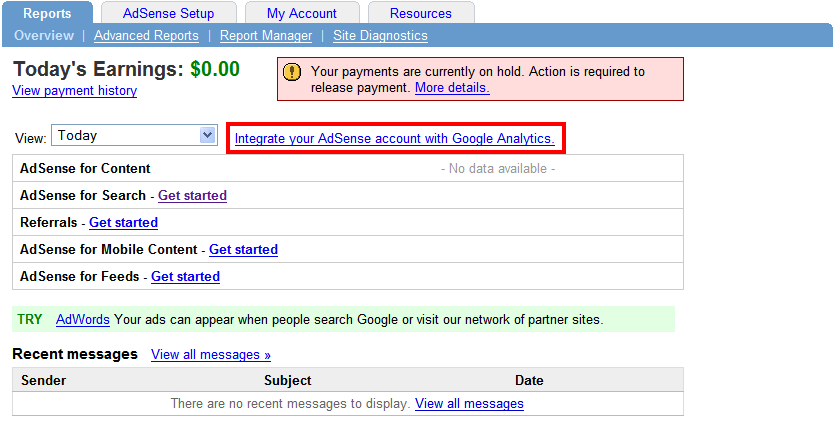
With all this good news there has to be a catch right? Well kinda of, these features are being “gradually rolled out”. Who knows how long it might be till you see it this option on your account but either way it is a very welcome addition and I can’t wait to try it out for myself. The option will appear not in your Analytics account but your Adsense one. See the below image.
You can check out the blog post by Google at the page here. Google is only sending invitations out to select accounts. Have you got yours? If so what are your thoughts?
Either there is no default mail client or the current mail client cannont fulfill the messaging request

Either there is no default mail client or the current mail client cannont fulfill the messaging request. Please run Microsoft Office Outlook and set it as the default mail client.

This little pop up as been annoying me for the last week or so. I’m not sure why or how this happened but I do know how to fix it. If your wondering im running Vista and Outlook 2007. What you need to do is open up regedit.

Do this (in XP) by going to start menu/run/ then type in “regedit” or in Vista simply hit the start menu and type “regedit” in the search box at the bottem. Once regedit is open navigate to:

HKEY_LOCAL_MACHINE\SOFTWARE\Clients\Mail\Microsoft Outlook

and delete it (after making a backup ofcourse, to do this right click and select export).

Now open Outlook, go to the help menu and select “Office Diagnostics”. Let that run and after which all your problems should be solved. It doesn’t come up that it has caught any problems but it has. Let me know how it went for you!

Update: If the above does not work try the following posted in the below comments. Thanks for the suggestion Vassilis!

“This worked for me:
Program files-> common files -> system ->msmapi ->1033 ->delete msmapi32.dll. When you restart outlook the file recreates itself and everything works.
Vassilis”

Use one mouse and keyboard for multiple computers

Do you use multiple computers on or near your desk? Constantly switching between the two? Then Input Director might just what your looking for. This great little program allows you to use the mouse and keyboard on your main computer for your secondary computers. This is brilliant for many situations including when you have a computer for work and one for play, you can easily switch between the two. Or you can put your laptop next to your computer and use it for secondary task such as browsing, chat, downloads/torrents etc. while using your main computer to do your design work in Photoshop or play that game while still being in touch with everything else to your side. It’s as easy as moving your mouse to the edge of your screen and it will seamlessly appear on your secondary computer!

Features:

  • Works on any Windows computer
    (Windows 2000 (Service Pack 4), Windows XP (Service Pack 2), Windows 2003 or Windows Vista)
  • Easy setup
  • FREE for personal non-commercial use
  • Small footprint (efficient)

Well enough reasons as to why this so great, I’m sure you just want to know how to set it up! Continue reading

Export Chrome bookmarks

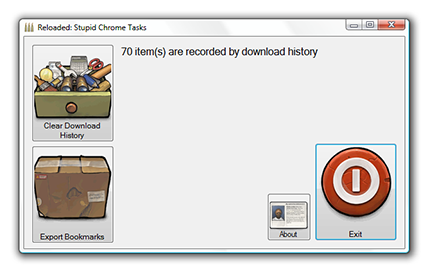
If you have been using Chrome for any decent amount of time you may have found yourself looking to save your current updated bookmarks in Chrome to the other browsers on your computer. Upon searching you will soon find that this is a missing feature from the browser. Lucky for you and me however, a coder by the name of Mark Clouden has developed a nice (and might I say slick looking) stand alone program that will not only export your bookmarks from Chrome but also delete your download history too (otherwise you would have to delete each entry one by one).

1) First download and install .NET 2.0 here.

2) Download Mark’s program here.

3) Make sure Chrome isn’t running (view this post from another browser)

4) Extract file from the zip to a folder on the desktop and click on the ChromeDump.exe file

5) Select the icon of your selected task (Clear Download History or Export Bookmarks)

If you love the app I would suggest to drop Mark a nice comment on his blog here:
https://blog.reloadedsoftware.com/2008/09/16/stupid-chrome-tasks/

New version of Facebook iPhone app released

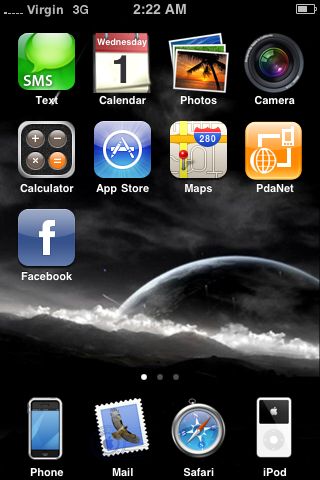
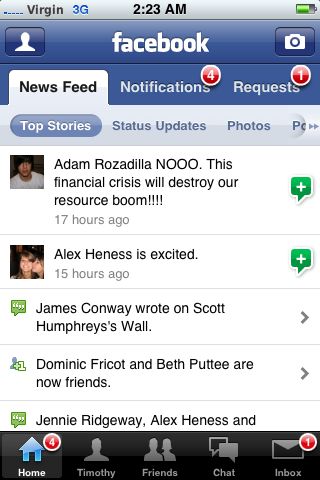
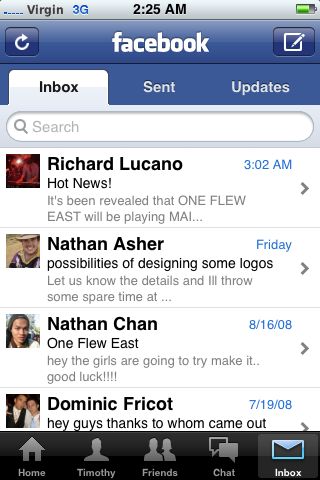
Facebook have released a new version of their iPhone application. The 2.0 update adds many new features, including the ability to accept requests and post photos to walls. A new icon has also come with this release (see images).

WHAT’S NEW IN THIS VERSION:
Version 2.0 finally brings the most popular features of the Facebook website to your iPhone, including:  

* Notifications 
* The full News Feed 
* News Feed story comments 
* People search 
* Friend requests 
* Photo tagging 
* Photo captioning 
* Photo posts to your friends’ Walls 
* The full Mini-Feed, now combined with The Wall 
* Your entire inbox, plus the sent folder and updates tab 
* Inbox search 
* Message attachments 

This update now positions the iPhone as a serious contender for mantaining your online presense on the social networking site. What are your experiences with the update? Will you use the iPhone as your primary access point to Facebook now?