Author: Tim | Filed under: Technology
Today I sold my iPhone 3G on Ebay. Before I went to send it off I wanted to erase all my settings and content. I used the feature called “reset all content and settings” which is found in the settings. It notified me that it may take up to two hours to do this so I left if for awhile. After 4 hours of constant restarting I started to think something wasn’t right.
After searching for a problem I came across a way to fix this problem and restore the iPhone. The following fix is thanks to Vitaliy Isikov.
1. Plug your phone into your computer and have iTunes running.
2. Hold down both the home and power buttons until the phone reboots and the screen is completely blank.
3. Let go of the power button and keep holding the home button until you see iTunes has recognized your phone in restore mode.
4. Restore your iPhone
Let me know if it worked for you in the comments!
Author: Tim | Filed under: Technology
Apple has announced the 4th generation iPhone today. It sports a front facing camera for video calling, an upgraded 5 megapixel camera for high quality photos and HD video. The phone features the new iOS 4 operating system which has the following new features: Multitasking, Folders, iBooks, 5x digital zoom, customisable wallpaper, spell checking and wireless keyboard support.

During Steve Job’s presentation the quality of the build of the phone was emphasized, with Apple using special glass and plastics. They also packed the insides tight so they could fit a larger battery and increase battery life.
Power and battery2
- Built-in rechargeable lithium-ion battery
- Charging via USB to computer system or power adapter
-
- Talk time:
- up to 7 hours on 3G
- up to 12 hours on 2G
- Standby time: up to 300 hours
-
- Internet use:
- up to 6 hours on 3G
- up to 9 hours on Wi-Fi
- Video playback: up to 10 hours
- Audio playback: up to 40 hours
Full specs can be found here: http://www.apple.com/au/iphone/specs.html.
Author: Tim | Filed under: Adobe, Dreamweaver, fixes, Technology

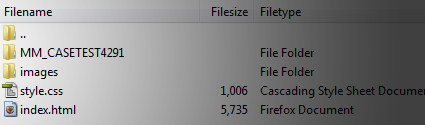
Was poking about my site via FTP today and found a file named “MM_CASETEST4291″. I was like, woah there, I didn’t put that there. My mind went through flashes of my site being hacked, site being using as a case test to some professor somewhere showing to his class how easy it is to gain access to a site but no. After reading some pages online. It’s just a file that Dreamweaver uses to test the connection (rewrite permissions etc).
This is also an example of code that has remained from the merger of Adobe and Macromedia (the MM in “MM_CASETEST4291″). Interesting that they haven’t gone through the code and removed all references to it. For those that didn’t know Adobe acquired Macromedia in 2005, their main competitor in the design software race.
Author: Tim | Filed under: Adsense, Analytics, Google, Technology

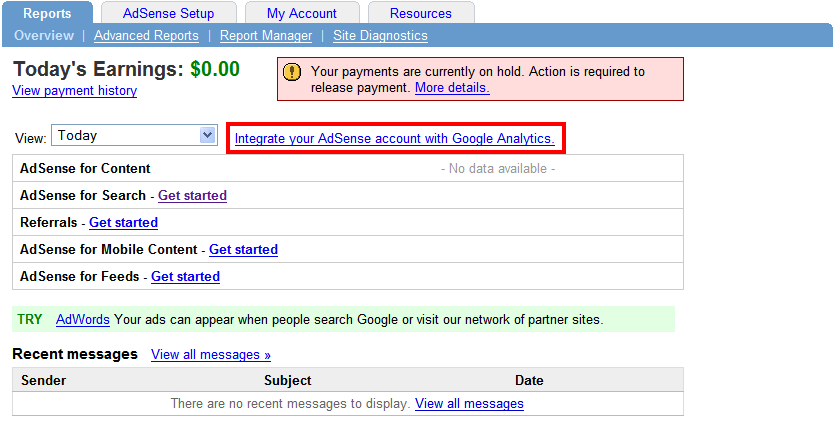
Google this month has finally released a well overdue feature to its industry leading Analytics tool; the integration of Google Analytics and Adsense. This is a feature that has been lacking for quite some time and one many thought would have been added long ago. Its addition is part of a major update to the tool which includes several “enterprise” features including Advanced Segments in Google Analytics, Motion Charts in Google Analytics, Custom Reporting in Google Analytics and the for mentioned AdSense Reporting in Google Analytics.
With all this good news there has to be a catch right? Well kinda of, these features are being “gradually rolled out”. Who knows how long it might be till you see it this option on your account but either way it is a very welcome addition and I can’t wait to try it out for myself. The option will appear not in your Analytics account but your Adsense one. See the below image.

You can check out the blog post by Google at the page here. Google is only sending invitations out to select accounts. Have you got yours? If so what are your thoughts?
Either there is no default mail client or the current mail client cannont fulfill the messaging request. Please run Microsoft Office Outlook and set it as the default mail client.
This little pop up as been annoying me for the last week or so. I’m not sure why or how this happened but I do know how to fix it. If your wondering im running Vista and Outlook 2007. What you need to do is open up regedit.
Do this (in XP) by going to start menu/run/ then type in “regedit” or in Vista simply hit the start menu and type “regedit” in the search box at the bottem. Once regedit is open navigate to:
HKEY_LOCAL_MACHINE\SOFTWARE\Clients\Mail\Microsoft Outlook
and delete it (after making a backup ofcourse, to do this right click and select export).
Now open Outlook, go to the help menu and select “Office Diagnostics”. Let that run and after which all your problems should be solved. It doesn’t come up that it has caught any problems but it has. Let me know how it went for you!
Update: If the above does not work try the following posted in the below comments. Thanks for the suggestion Vassilis!
“This worked for me:
Program files-> common files -> system ->msmapi ->1033 ->delete msmapi32.dll. When you restart outlook the file recreates itself and everything works.
Vassilis”